









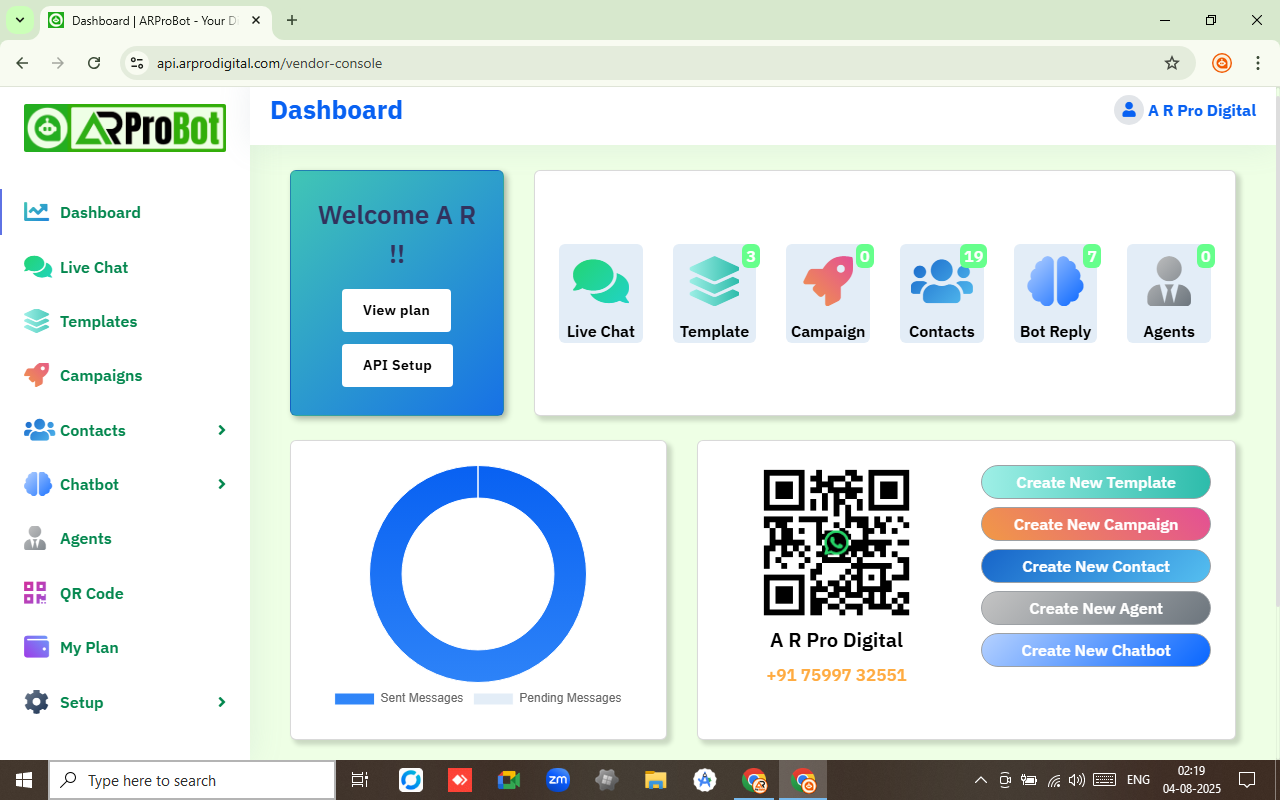
ARProBot – Built on Official WhatsApp Cloud API
ARProBot integration allows for real-time messaging, automated responses, and easy management of WhatsApp interactions. With full access to the WhatsApp Cloud API, businesses can send and receive messages, share multimedia, and maintain secure conversations with customers worldwide. The panel simplifies the process of connecting to the WhatsApp platform, offering features like automated workflows, data analytics, and template management. Experience the flexibility and efficiency of WhatsApp business communications, all within one unified interface.
Features of ARProBot
API Integration
APIs enable smooth integration and data sharing between services.
Integrated WhatsApp Chat
Seamlessly connect with customers through Integrated WhatsApp Chat.
QR Code
Quickly generate QR codes for your WhatsApp phone number with ease.
Manage Templates
Create and manage templates directly in the app without visiting Meta.
Campaigns
Effortlessly manage your campaigns with Campaign Management Feature.
ChatBot
Engage customers 24/7 with intelligent chatbot responses effortlessly.
Flow Maker
Build Bot conversions easily and effectively with Advance Flow Maker.
Live Analysis
Get Realtime Analysis and Status of your Campaigns and Messages.
Assign Agents
Assign Chats to Agents or your Team Members with Agents Feature.
Why WhatsApp API
*Data is indicative and may change over time.
Start Your Own Brand - Be Your Own Boss!
White Label Business Model!
We bring you an amazing opportunity
- Start your business with our premium products
- Sell under your own brand without any hassle
- Get high-quality products at unbeatable prices
- Enjoy full backend support, expert guidance & training
- Easy-to-use dashboard for you and your clients
- Reseller panel with full control over users & plans
- Fully hosted & managed with your domain
Whatsapp API FAQ's
1. How can I integrate WhatsApp with my business account?
To integrate WhatsApp with your business account, simply sign up for our app. After signing up, you will receive a verification email, once your email is verified, you can log in to the dashboard. From there, connect your WhatsApp Business Account with your verified Facebook Business Manager, and follow the step-by-step guide provided in the dashboard to complete the setup. The integration works directly with the official WhatsApp Cloud API, ensuring a secure, fast, and reliable messaging experience.
2. Can I manage multiple phone numbers on the same WhatsApp Business Account?
Yes, our app supports managing multiple phone numbers for the same WhatsApp Business Account, enabling you to handle communication from different channels in a single interface.
3. How do I create and manage message templates?
You can easily create and manage WhatsApp message templates directly within our app, without needing to visit Meta platform. Simply navigate to the templates section, create your template, and use it in your campaigns.
4. What kind of data analytics does the app provide?
The app provides real-time analytics on message delivery, open rates, response times, and user engagement. You can track the performance of your WhatsApp campaigns and optimize them based on these insights.
5. Is my data secure when using this app?
Yes, we prioritize security and use industry-standard encryption to protect your data. All communications through the app are fully compliant with WhatsApp privacy and security policies, ensuring your business and customer data is safe.
6. What is WhatsApp Conversation Rates in India: ?
₹0.785/ Marketing Conversation, ₹0.115/ Authentication Conversation, ₹0.115/ Utility Conversation and ₹0.00/ChatBot Reply.
7. Is white lable business plan available and what do you provide for that?
Yes you can launch your own WhatsApp Business API and Automation platform under your brand, on your domain & hosting, we provide everything you need to kickstart your journey, including the complete source code and setup support.
8. Do you also help with Facebook Business Manager verification?
Yes, we do assist with the Facebook Business Manager verification process using the ID provided by you. However, this service is chargeable separately based on the scope of work. Please note that all required documents for verification must be provided by the client.
9. What documents and information are required to successfully verify a Facebook Business Manager account?
To verify your Facebook Business Manager account, you are required to submit valid documents confirming both your business identity and business address. For business identity proof, you may submit any one of the following: a Business Registration Certificate, GST Certificate, or MSME Registration. For address verification, acceptable documents include a recent utility bill (such as telephone or electricity), a bank statement, or a tax certificate, provided they clearly mention your business name and address.
In addition, it is recommended to have an active SIM card, a professional business website, and a domain-based business email address (e.g., info@yourbiz.com) to strengthen the credibility of your application. The person submitting the request must also provide a valid government-issued ID, such as an Aadhaar card or PAN card.
All submitted documents must be clear, legible, and the details should exactly match the information provided in your Facebook Business Manager account. Facebook may also verify domain ownership and website authenticity as part of the verification process.
10. How much time does the entire verification and integration process take?
The WhatsApp API panel can be activated within one day after signup and initial setup. The remaining verification steps, such as Facebook Business Manager approval and WhatsApp Business API approval, usually get completed within 3-7 days. However, please note that the overall timeline may vary slightly as it depends on Meta’s internal review process, in some cases, it may take a bit longer or get approved sooner. We aim to assist you at every step to ensure a smooth and timely integration.
What Our Customers Say

"WhatsApp API helped us streamline responses, track leads, and close more deals. Simple, fast, and super effective solution!" – Rohit Verma

"Managing customer chats is now effortless. Team coordination improved drastically. A must-have tool for any growing business!" – Sneha Kapoor

"Auto-replies, chat assignment, and follow-ups made easy. Best CRM for WhatsApp we've used so far. Great support too!" – Amit Sharma
Need Custom Integration?
If you need any custom integration then fill out the form and our support team will contact you.
Why Businesses Trust Us
Affordable Pricing
Reasonable plans for businesses of all sizes.
Scalable Solutions
Grow seamlessly as your business expands.
Fast Implementation
Get up and running your business in just a few steps.
Reliable Support
Expert help available whenever you need it.
Would you like to start a project with us?
Expert Solutions for Ambitious Projects | Let's Get Started!
